Tuesday, February 7, 2012

Compostion Assignment (Photos due Monday!)

Be sure to READ ALL of the following info and click on the links at the bottom:


Photo Composition Rules

What is a photograph? It is a story. What is a story? It is is a series of sentences connected to each other. The same is true about photography. To create a photograph, it is not enough just to take an image of something. The first impression from a photograph is determined by the composition balance of an image.

To increase the expressiveness of your digital pictures, apply the picture composition rules while taking the photos or modeling their edges.

Rule of Thirds
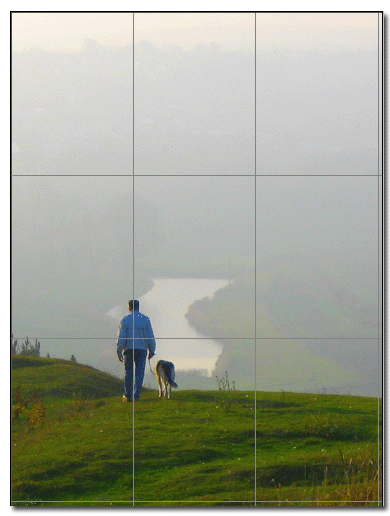
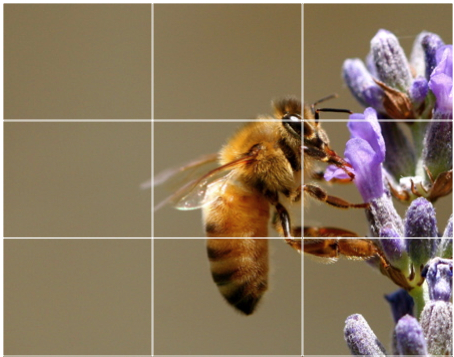
The Rule of Thirds is based on the fact that the human eye is naturally drawn to a point about two-thirds up a page. Crop your photo so that the main subjects are located around one of the intersection points rather than in the center of the image:
Your landscapes will be optimally pleasing to the eye if you apply the Rule of Thirds when you place your horizon line. If the area of interest is land or water, the horizon line will usually be two-thirds up from the bottom. Alternately, if the sky is the area of emphasis, the horizon line may be one-third up from the bottom, leaving the sky to take up the top two-thirds of the picture:


Diagonal Rule
One side of the picture is divided into two, and then each half is divided into three parts. The adjacent side is divided so that the lines connecting the resulting points form a diagonal frame. According to the Diagonal Rule, important elements of the picture should be placed along these diagonals:



Linear elements, such as roads, waterways, and fences placed diagonally, are generally perceived as more dynamic than horizontally placed ones:


Your Assignment:
Click on the following link:
Composition Information
Click on the various images to view all the information about Composition Rules and Photography

Your Photos:
You will need to take at least 10 photos for each of  the following:  (This is a total of at least 50 images!)
  • Rule of thirds,
  • Diagonal rule,
  • Leading lines,
  • Dramatic angles and 
  • Frames
Be sure to fill the frame, avoid amputation, watch the background (keep it simple!), watch for aliens, and simplify, simplify, SIMPLIFY!


Click on these links to learn more about Photo Composition.  It is important that you click and read these!

Amateur Snapper
Photoinf
Photoinf-Geoff Lawrence
Elements of Design &lt

PHOTOS ARE DUE ON MONDAY!

Wednesday, February 1, 2012

Paint.NET PowerPoint

You will probably hate this assignment, but afterwards, you will know how to use Paint.NET


Using Microsoft PowerPoint you will show examples of the following:

For each item, you need to include:
  1. Type the Title (ex. Gaussian Blur),
  2. Explain what it does and how it works (The less words you use the better, but explain it in a way that you understand. YOU MUST USE YOUR OWN WORDS!)
  3. Post an original unedited photo
  4. and then one where you have adjusted the image using the tool/effect/adjustment. (For Layers, then you will need to use 2 photos and have them in 2 different layers)
Example of one slide: (mine is copied from the website, yours MUST be original and use your own photos! If you don't have any photos of your own yet, then select one from www.sxc.hu)


Monday, January 30, 2012

Value Photos Due Today!

Step 1:   Get together with a group of 2 and no more than 3 people.  Look at each other's (30-50) images.  Try to help them select their best photographs.  Look for a complete value range from white to gray to black.  Look for a good balance in value AND for photos that use the ELEMENTS & PRINCIPLES of art!   Try to narrow the best photos down to 3 to 5.  (Below are some examples of photos that have a full range of value.  You can click on them to see a larger view)

Step 2:  Decide on your 3 to 5 strongest images.

Step 3: Open an image (it is best to work one at a time) with Paint.NET.   Edit the photos to be BLACK & WHITE....and then adjust the contrast as needed.  No other adjustments and/or filters are to be used.

Step 4:  After you edit them, SAVE the 3-5 edited photos as .JPG files on your Flash Drive.

Step 5:  Post each of the edited photos to your blog.

Step 6: Click the Links on the sidebar to view the blogs of other students to see everyone's work.


Friday, January 27, 2012

Next.....

Make sure you have the following complete.....

1. Email Account Set-Up and Email Sent to ecrouch@access.k12.wv.us
2. Elements & Principles PowerPoint Finished and Checked
3. Blog Set Up at www.blogger.com


Then, 
4. Set up a new account at www.sxc.hu  (NO MORE GOOGLE IMAGES, EVER!)
5. Comment at the bottom of this post with your Blog Address.  (It should be something like this ErinsPhotos.blogspot.com)  It is VERY IMPORTANT that you type it correctly, so I can link to all of your blogs on here.


Wednesday, January 18, 2012

WebQuest (Continued)

Today will be the last day to work on your History of Photography WebQuest.

On Friday, we will present them in Room 210.

History of Photography WebQuest

History Of Photography WebQuest


Today you need to get into groups of three.
Then click the following link and then follow the directions there.

http://www.historyofphotographywebquest.blogspot.com/

Tuesday, December 20, 2011

Welcome to Photo Art!

This is the place that will come to look for assignments, reminders, examples of artwork, links, etc.

EVERYDAY, at the beginning of class, you will log on to the computers....then go directly to this website. 

So, please write down the address.  It is http://www.crouchphotoart.blogspot.com/  I promise that pretty soon you will have it memorized.  Again, you are to go to this blog as soon as you log on the computers every single day.

There is a place below where you can leave comments.  Please do so if you have any questions or comments to make! I <3 comments!

For now.... Here are some important links you will need.

ShortCourse Textbook of Digital Photography

Download Paint.NET

Paint.NET tutorials

Gimp

Picnik

Picassa

Digital Photography WebQuest